a. Kubespray란?
- Kubespray는 Ansible 기반으로 k8s cluster를 자동으로 설치/업그레이드/관리하기 위한 오프소스 배포 도구이다 ( kubeadm 처럼 k8s 관련 도구 중 1 )
- 역할 및 기능 ( 클러스터 운영 전반을 지원 )
- 신규 클러스터 생성
- ( Control Plane ) 클러스터 업그레이드
- 클러스터 스케일링
- 노드 관리 - 노드 추가, 노드 제거
- 클러스터 재설정
- 설정 관리
- 백업 / 복구, 업그레이드시 ETCD 스냅샷 수행
- Kubespray 한 버전당 Kubernetes 3개 minor 지원
- 항상 1~2 버전 늦춰서 안정화 후 포함
- 운영 시 버전 추천
- Dev 환경 : Kubespray 최신 + K8s N-1
- Prd 환경 : Kubespray 최신-1 + K8s N-2
- 역할 및 기능 ( 클러스터 운영 전반을 지원 )
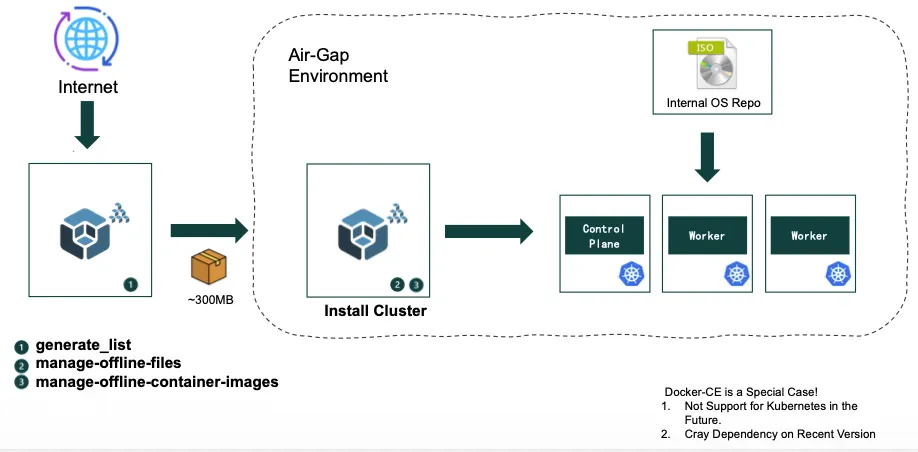
- kubespray 소개 및 사용 이유 : Ansible 기반이기에 ssh만 연결된다면 관리에 용이하다.
퍼블릭/폐쇄망의 서버환경에서도 쿠버네티스가 사용가능하다. - 컨트롤 플레인과 ETCD에 대한 HA환경을 지원한다.
- Client Side LB를 지원하여 분산 접속을 가능하게끔 지원한다.(kubeadm의 경우 직접세팅필요)
- Certificate에 대해서도 Auto Renew를 제공해서 자동으로 갱신처리한다.
- BestPractice의 설정들을 Playbook형태로 제공을 해준다.
- 다양한 Linux배포판을 지원한다.

b. 실습 환경
- 사전 환경 설정
# 파일 다운로드
wget https://raw.githubusercontent.com/gasida/vagrant-lab/refs/heads/main/k8s-kubespary/Vagrantfile
wget https://raw.githubusercontent.com/gasida/vagrant-lab/refs/heads/main/k8s-kubespary/init_cfg.sh
## file 확인
ll
total 16
-rw-r--r--@ 1 howoo staff 982B Jan 28 15:42 Vagrantfile
-rw-r--r--@ 1 howoo staff 1.3K Jan 28 15:43 init_cfg.sh
## 실습 환경 배포
vagrant up
.
.
.
k8s-ctr: Running: /var/folders/s_/d0ls80f161x0q83j7lx_k5wh0000gn/T/vagrant-shell20260128-6889-zu7q2i.sh
k8s-ctr: >>>> Initial Config Start <<<<
k8s-ctr: [TASK 1] Change Timezone and Enable NTP
k8s-ctr: [TASK 2] Disable firewalld and selinux
k8s-ctr: [TASK 3] Disable and turn off SWAP & Delete swap partitions
k8s-ctr: [TASK 4] Config kernel & module
k8s-ctr: [TASK 5] Setting Local DNS Using Hosts file
k8s-ctr: [TASK 6] Delete default routing - enp0s9 NIC
k8s-ctr: >>>> Initial Config End <<<<
howoo@ttokkang-ui-MacBookAir ~/Desktop/work/Gasida_series/idc_k8s/k8s-kubespary vagrant status
Current machine states:
k8s-ctr running (virtualbox)
The VM is running. To stop this VM, you can run `vagrant halt` to
shut it down forcefully, or you can run `vagrant suspend` to simply
suspend the virtual machine. In either case, to restart it again,
simply run `vagrant up`.
## ssh 접속 후 설정
vagrant status
Current machine states:
k8s-ctr running (virtualbox)
------------------------------
root@k8s-ctr:~# uname -a
Linux k8s-ctr 6.12.0-55.39.1.el10_0.aarch64 #1 SMP PREEMPT_DYNAMIC Wed Oct 15 11:18:23 EDT 2025 aarch64 GNU/Linux
root@k8s-ctr:~# which python && python -V
/usr/bin/python
Python 3.12.9
root@k8s-ctr:~# which python3 && python3 -V
/usr/bin/python3
Python 3.12.9
oot@k8s-ctr:~# dnf install -y python3-pip git
Rocky Linux 10 - BaseOS 0.0 B/s | 0 B 00:00
Errors during downloading metadata for repository 'baseos':
- Curl error (6): Could not resolve hostname for https://mirrors.rockylinux.org/mirrorlist?arch=aarch64&repo=BaseOS-10 [Could not resolve host: mirrors.rockylinux.org]
Error: Failed to download metadata for repo 'baseos': Cannot prepare internal mirrorlist: Curl error (6): Could not resolve hostname for https://mirrors.rockylinux.org/mirrorlist?arch=aarch64&repo=BaseOS-10 [Could not resolve host: mirrors.rockylinux.org]
root@k8s-ctr:~# vim /etc/resolv.conf
root@k8s-ctr:~# dnf install -y python3-pip git
Rocky Linux 10 - BaseOS 531 kB/s | 12 MB 00:23
Rocky Linux 10 - AppStream 123 kB/s | 2.1 MB 00:17
Rocky Linux 10 - Extras 384 B/s | 6.2 kB 00:16
Dependencies resolved.
.
.
.
Complete!
root@k8s-ctr:~# which pip && pip -V
/usr/bin/pip
pip 23.3.2 from /usr/lib/python3.12/site-packages/pip (python 3.12)
root@k8s-ctr:~# which pip3 && pip3 -V
/usr/bin/pip3
pip 23.3.2 from /usr/lib/python3.12/site-packages/pip (python 3.12)
root@k8s-ctr:~# echo "root:qwe123" | chpasswd
root@k8s-ctr:~# cat << EOF >> /etc/ssh/sshd_config
PermitRootLogin yes
PasswordAuthentication yes
EOF
root@k8s-ctr:~# systemctl restart sshd
root@k8s-ctr:~# ssh-keygen -t rsa -N "" -f /root/.ssh/id_rsa
Generating public/private rsa key pair.
Your identification has been saved in /root/.ssh/id_rsa
Your public key has been saved in /root/.ssh/id_rsa.pub
The key fingerprint is:
SHA256:OdD1TkSOOxJl5wHu/WPmZQtqdOE3GS053Kjwxxvb8xU root@k8s-ctr
The key's randomart image is:
+---[RSA 3072]----+
| =o= |
| . = B . |
| . o o =. +.|
| . +.= .*.o|
| S +o+o.Eo|
| o oo+++.|
| . .o*==|
| ..++=+|
| .. ..+|
+----[SHA256]-----+
root@k8s-ctr:~# ls -al ~/.ssh/
total 8
drwx------. 2 root root 38 Jan 28 15:52 .
dr-xr-x---. 3 root root 119 Jan 28 15:49 ..
-rw-------. 1 root root 2602 Jan 28 15:52 id_rsa
-rw-r--r--. 1 root root 566 Jan 28 15:52 id_rsa.pub
root@k8s-ctr:~# ssh-copy-id -o StrictHostKeyChecking=no root@192.168.10.10
/usr/bin/ssh-copy-id: INFO: Source of key(s) to be installed: "/root/.ssh/id_rsa.pub"
/usr/bin/ssh-copy-id: INFO: attempting to log in with the new key(s), to filter out any that are already installed
/usr/bin/ssh-copy-id: INFO: 1 key(s) remain to be installed -- if you are prompted now it is to install the new keys
root@192.168.10.10's password:
Number of key(s) added: 1
Now try logging into the machine, with: "ssh -o 'StrictHostKeyChecking=no' 'root@192.168.10.10'"
and check to make sure that only the key(s) you wanted were added.
root@k8s-ctr:~# cat /root/.ssh/authorized_keys
ssh-rsa AAAAB3NzaC1yc2EAAAADAQABAAABgQCfVlv8LgLkkE5XoaKF4C6cPFxHBU2SVTnC20NamU03ITKSdZl/T7TJrIF2UBt/P1lQgCB5LImQYJVY06nSygYgIQd7BBxeXvpZ0kgYA2sXn1FRsuu3feTaJZQ1dAee0ZhMJfL7JEAKSLyvdnynCbvOXwVcgvW8EnOA1U+DFdQBBKLlGlMC89YLVKAz9KRTArAM4XsFKlYYR6OPYTDderiNNITQMEiT6BpJE43P+ai1nnIjc2IOzWItsziSnROzPoedfQcNC9lbqyg/lco+5D+MCT32rcs1mxLdI1tvPSMC9RqNpEUNk5t1FRFl6Fn5PJ7fk7aOOpW3H74uoxNqmmXDcjBOnsnX9f+Igv4VPZkigYk/glMbxsTOfgUwVBSH39UaiW7JWdq+taa2VNf9QVf3Ucdde6mGg4V9HNqHzvP9B7deo4YSaSpAFzJd1Vwle9cQzc3tiMBPUOZRxM0NOjWaAux5k0iu+In++iFVeFcLDRvHN+2JSwiKONRPP1ofgY0= root@k8s-ctr
root@k8s-ctr:~# ssh root@192.168.10.10 hostname
k8s-ctr
root@k8s-ctr:~# ssh -o StrictHostKeyChecking=no root@k8s-ctr hostname
Warning: Permanently added 'k8s-ctr' (ED25519) to the list of known hosts.
k8s-ctr
root@k8s-ctr:~# ssh root@k8s-ctr hostname
k8s-ctr
# 환경 설정
**pip3 install -r /root/kubespray/requirements.txt
.
.
.
Downloading ansible-10.7.0-py3-none-any.whl (51.6 MB)
━━━━━━━━━━━━━━━━━━━━━━━━━━━━━━━━━━━━━━━━ 51.6/51.6 MB 6.1 MB/s eta 0:00:00
Downloading cryptography-46.0.2-cp311-abi3-manylinux_2_34_aarch64.whl (4.3 MB)
━━━━━━━━━━━━━━━━━━━━━━━━━━━━━━━━━━━━━━━━ 4.3/4.3 MB 6.7 MB/s eta 0:00:00
Downloading jmespath-1.0.1-py3-none-any.whl (20 kB)
Downloading netaddr-1.3.0-py3-none-any.whl (2.3 MB)
━━━━━━━━━━━━━━━━━━━━━━━━━━━━━━━━━━━━━━━━ 2.3/2.3 MB 6.0 MB/s eta 0:00:00
Downloading ansible_core-2.17.14-py3-none-any.whl (2.2 MB)
━━━━━━━━━━━━━━━━━━━━━━━━━━━━━━━━━━━━━━━━ 2.2/2.2 MB 5.6 MB/s eta 0:00:00
Downloading cffi-2.0.0-cp312-cp312-manylinux2014_aarch64.manylinux_2_17_aarch64.whl (220 kB)
━━━━━━━━━━━━━━━━━━━━━━━━━━━━━━━━━━━━━━ 220.1/220.1 kB 6.5 MB/s eta 0:00:00
Downloading jinja2-3.1.6-py3-none-any.whl (134 kB)
━━━━━━━━━━━━━━━━━━━━━━━━━━━━━━━━━━━━━━ 134.9/134.9 kB 9.8 MB/s eta 0:00:00
Downloading resolvelib-1.0.1-py2.py3-none-any.whl (17 kB)
Downloading pycparser-3.0-py3-none-any.whl (48 kB)
━━━━━━━━━━━━━━━━━━━━━━━━━━━━━━━━━━━━━━━━ 48.2/48.2 kB 3.6 MB/s eta 0:00:00
Downloading markupsafe-3.0.3-cp312-cp312-manylinux2014_aarch64.manylinux_2_17_aarch64.manylinux_2_28_aarch64.whl (24 kB)
Installing collected packages: resolvelib, pycparser, netaddr, MarkupSafe, jmespath, jinja2, cffi, cryptography, ansible-core, ansible
Successfully installed MarkupSafe-3.0.3 ansible-10.7.0 ansible-core-2.17.14 cffi-2.0.0 cryptography-46.0.2 jinja2-3.1.6 jmespath-1.0.1 netaddr-1.3.0 pycparser-3.0 resolvelib-1.0.1
WARNING: Running pip as the 'root' user can result in broken permissions and conflicting behaviour with the system package manager. It is recommended to use a virtual environment instead: https://pip.pypa.io/warnings/venv
root@k8s-ctr:~/kubespray# which ansible
/usr/local/bin/ansible
root@k8s-ctr:~/kubespray# ansible --version
ansible [core 2.17.14]
config file = /root/kubespray/ansible.cfg
configured module search path = ['/root/kubespray/library']
ansible python module location = /usr/local/lib/python3.12/site-packages/ansible
ansible collection location = /root/.ansible/collections:/usr/share/ansible/collections
executable location = /usr/local/bin/ansible
python version = 3.12.9 (main, Aug 14 2025, 00:00:00) [GCC 14.2.1 20250110 (Red Hat 14.2.1-7)] (/usr/bin/python3)
jinja version = 3.1.6
libyaml = True
root@k8s-ctr:~/kubespray# pip list
Package Version
------------------------- -----------
ansible 10.7.0
ansible-core 2.17.14
attrs 23.2.0
.
.
.**- Kubespray를 통한 K8s 배포
root@k8s-ctr:~/kubespray# cp -rfp /root/kubespray/inventory/sample /root/kubespray/inventory/mycluster
root@k8s-ctr:~/kubespray# tree inventory/mycluster/
inventory/mycluster/
├── group_vars
│   ├── all
│   │   ├── all.yml
                                        .
                                        .
                                        .

root@k8s-ctr:~/kubespray# cat << EOF > /root/kubespray/inventory/mycluster/inventory.ini
k8s-ctr ansible_host=192.168.10.10 ip=192.168.10.10

[kube_control_plane]
k8s-ctr

[etcd:children]
kube_control_plane

[kube_node]
k8s-ctr
EOF

# 테스트할 기능 관련 수정
root@k8s-ctr:~/kubespray# sed -i 's|kube_network_plugin: calico|kube_network_plugin: flannel|g' inventory/mycluster/group_vars/k8s_cluster/k8s-cluster.yml
root@k8s-ctr:~/kubespray# sed -i 's|kube_proxy_mode: ipvs|kube_proxy_mode: iptables|g' inventory/mycluster/group_vars/k8s_cluster/k8s-cluster.yml
root@k8s-ctr:~/kubespray# sed -i 's|enable_nodelocaldns: true|enable_nodelocaldns: false|g' inventory/mycluster/group_vars/k8s_cluster/k8s-cluster.yml
root@k8s-ctr:~/kubespray# sed -i 's|auto_renew_certificates: false|auto_renew_certificates: true|g' inventory/mycluster/group_vars/k8s_cluster/k8s-cluster.yml
root@k8s-ctr:~/kubespray# sed -i 's|# auto_renew_certificates_systemd_calendar|auto_renew_certificates_systemd_calendar|g' inventory/mycluster/group_vars/k8s_cluster/k8s-cluster.yml

# flannel 설정 수정
root@k8s-ctr:~/kubespray# echo "flannel_interface: enp0s9" >> inventory/mycluster/group_vars/k8s_cluster/k8s-net-flannel.yml
root@k8s-ctr:~/kubespray# grep "^[^#]" inventory/mycluster/group_vars/k8s_cluster/k8s-net-flannel.yml
flannel_interface: enp0s9

root@k8s-ctr:~/kubespray# sed -i 's|helm_enabled: false|helm_enabled: true|g' inventory/mycluster/group_vars/k8s_cluster/addons.yml
root@k8s-ctr:~/kubespray# sed -i 's|metrics_server_enabled: false|metrics_server_enabled: true|g' inventory/mycluster/group_vars/k8s_cluster/addons.yml
root@k8s-ctr:~/kubespray# sed -i 's|node_feature_discovery_enabled: false|node_feature_discovery_enabled: true|g' inventory/mycluster/group_vars/k8s_cluster/addons.yml

root@k8s-ctr:~/kubespray# ls -al ./*.txt
-rw-r--r--. 1 root root   631 Jan 28 16:04 ./df-1.txt
-rw-r--r--. 1 root root  3241 Jan 28 16:04 ./findmnt-1.txt
-rw-r--r--. 1 root root  1459 Jan 28 16:04 ./ip_addr-1.txt
-rw-r--r--. 1 root root   181 Jan 28 15:54 ./requirements.txt
-rw-r--r--. 1 root root   696 Jan 28 16:04 ./ss-1.txt
-rw-r--r--. 1 root root 44424 Jan 28 16:04 ./sysctl-1.txt

## 배포
ansible-playbook -i inventory/mycluster/inventory.ini -v cluster.yml -e kube_version="1.33.3" **--list-tasks** # 배포 전, Task 목록 확인
ANSIBLE_FORCE_COLOR=true **ansible-playbook -i inventory/mycluster/inventory.ini -v cluster.yml -e kube_version="1.33.3" | tee kubespray_install.log**
                                                                .
                                                                .
                                                                .
download : Download_file | Download item -------------------------------- 7.34s
container-engine/nerdctl : Download_file | Download item ---------------- 7.22s
container-engine/runc : Download_file | Download item ------------------- 7.17s
- alias, 명령어 자동 완성
# Source the completion
source <(kubectl completion bash)
source <(kubeadm completion bash)

# Alias kubectl to k
alias k=kubectl
complete -o default -F __start_kubectl k

# k9s 설치 : https://github.com/derailed/k9s
CLI_ARCH=amd64
if [ "$(uname -m)" = "aarch64" ]; then CLI_ARCH=arm64; fi
wget https://github.com/derailed/k9s/releases/latest/download/k9s_linux_${CLI_ARCH}.tar.gz
tar -xzf k9s_linux_*.tar.gz
ls -al k9s
chown root:root k9s
mv k9s /usr/local/bin/
chmod +x /usr/local/bin/k9s
k9s
- 환경 설정 및 적용
root@k8s-ctr:~/kubespray# sysctl fs.file-max
fs.file-max = 9223372036854775807
root@k8s-ctr:~/kubespray# cat /proc/sys/fs/file-max
9223372036854775807
root@k8s-ctr:~/kubespray# ulimit -n
1024
root@k8s-ctr:~/kubespray# systemctl show kubelet | grep LimitNOFILE
LimitNOFILE=524288
LimitNOFILESoft=1024

root@k8s-ctr:~/kubespray# cat << EOF >> inventory/mycluster/group_vars/all/containerd.yml
containerd_default_base_runtime_spec_patch:
  process:
    rlimits: []
EOF

**ansible-playbook -i inventory/mycluster/inventory.ini -v cluster.yml --tags "container-engine" --limit k8s-ctr -e kube_version="1.33.3"

root@k8s-ctr:~/kubespray# kubectl delete pod ubuntu
pod "ubuntu" deleted
root@k8s-ctr:~/kubespray# cat << EOF | kubectl apply -f -
apiVersion: v1
kind: Pod
metadata:
  name: ubuntu
spec:
  containers:
  - name: ubuntu
    image: ubuntu
    command: ["sh", "-c", "sleep infinity"]
    securityContext:
      privileged: true
EOF
pod/ubuntu created
root@k8s-ctr:~/kubespray# kubectl exec -it ubuntu -- sh -c 'ulimit -a'
time(seconds)        unlimited
file(blocks)         unlimited
data(kbytes)         unlimited
stack(kbytes)        8192
coredump(blocks)     unlimited
memory(kbytes)       unlimited
locked memory(kbytes) unlimited
process              unlimited
nofiles              1048576
vmemory(kbytes)      unlimited
locks                unlimited
rtprio               0

ansible-playbook -i inventory/mycluster/inventory.ini -v cluster.yml --tags "container-engine" --list-tasks
                                            .
                                            .
                                            .
  play #15 (k8s_cluster): Apply resolv.conf changes now that cluster DNS is up    TAGS: []
    tasks:

## Script 확인

                                            .
                                            .
                                            .
/registry/services/specs/node-feature-discovery/node-feature-discovery-master

compact_rev_key

root@k8s-ctr:~# etcdctl.sh member list -w table
+------------------+---------+-------+----------------------------+----------------------------+------------+
|        ID        | STATUS  | NAME  |         PEER ADDRS         |        CLIENT ADDRS        | IS LEARNER |
+------------------+---------+-------+----------------------------+----------------------------+------------+
| a997582217e26c7f | started | etcd1 | https://192.168.10.10:2380 | https://192.168.10.10:2379 |      false |
+------------------+---------+-------+----------------------------+----------------------------+------------+

# 설치된 정보 확인
root@k8s-ctr:~/kubespray# cat sysctl-1.txt | grep net.ipv4.ip_local_reserved_ports
net.ipv4.ip_local_reserved_ports =
root@k8s-ctr:~/kubespray# cat sysctl-2.txt | grep net.ipv4.ip_local_reserved_ports
net.ipv4.ip_local_reserved_ports = 30000-32767
root@k8s-ctr:~/kubespray# sysctl net.ipv4.ip_local_reserved_ports
net.ipv4.ip_local_reserved_ports = 30000-32767

# node별 최대 파드 배치 개수 확인
root@k8s-ctr:~/kubespray# kubectl describe node
  kube-system                 metrics-server-7cd7f9897-f9ngp                    100m (2%)     100m (2%)   200Mi (6%)       200Mi (6%)     2d3h
  node-feature-discovery      node-feature-discovery-gc-6c9b8f4657-drclc        0 (0%)        0 (0%)      0 (0%)           0 (0%)         2d3h
  node-feature-discovery      node-feature-discovery-master-6989794b78-gfvcx    0 (0%)        0 (0%)      0 (0%)           0 (0%)         2d3h
  node-feature-discovery      node-feature-discovery-worker-q44fg               0 (0%)        0 (0%)      0 (0%)           0 (0%)         2d3h
Allocated resources:
  (Total limits may be over 100 percent, i.e., overcommitted.)
  Resource           Requests        Limits
  --------           --------        ------
  cpu                920m (27%)      400m (11%)
  memory             349220Ki (11%)  1024288000 (33%)
  ephemeral-storage  0 (0%)          0 (0%)
  hugepages-1Gi      0 (0%)          0 (0%)
  hugepages-2Mi      0 (0%)          0 (0%)
  hugepages-32Mi     0 (0%)          0 (0%)
  hugepages-64Ki     0 (0%)          0 (0%)
Events:
  Type     Reason                   Age                From             Message
  ----     ------                   ----               ----             -------
  Normal   Starting                 10m                kube-proxy
  Normal   Starting                 11m                kubelet          Starting kubelet.
  Warning  InvalidDiskCapacity      11m                kubelet          invalid capacity 0 on image filesystem
  Normal   NodeHasSufficientMemory  11m (x8 over 11m)  kubelet          Node k8s-ctr status is now: NodeHasSufficientMemory
  Normal   NodeHasNoDiskPressure    11m (x8 over 11m)  kubelet          Node k8s-ctr status is now: NodeHasNoDiskPressure
  Normal   NodeHasSufficientPID     11m (x7 over 11m)  kubelet          Node k8s-ctr status is now: NodeHasSufficientPID
  Normal   NodeAllocatableEnforced  11m                kubelet          Updated Node Allocatable limit across pods
  Warning  Rebooted                 10m                kubelet          Node k8s-ctr has been rebooted, boot id: 1926a28f-f34f-4605-b1bd-98e6b897d174
  Normal   RegisteredNode           10m                node-controller  Node k8s-ctr event: Registered Node k8s-ctr in Controller
root@k8s-ctr:~/kubespray# kubectl describe node | grep pods
  pods:               110
  pods:               110
  Normal   NodeAllocatableEnforced  11m                kubelet          Updated Node Allocatable limit across pods

  # 설치된 정보 확인
root@k8s-ctr:~/kubespray# ls -al | grep block
root@k8s-ctr:~/kubespray# kubectl get pod -n kube-system -l tier=control-plane
NAME                              READY   STATUS    RESTARTS      AGE
kube-apiserver-k8s-ctr            1/1     Running   5 (14m ago)   2d3h
kube-controller-manager-k8s-ctr   1/1     Running   6 (14m ago)   2d3h
kube-scheduler-k8s-ctr            1/1     Running   5 (14m ago)   2d3h

CERTIFICATE AUTHORITY   EXPIRES                  RESIDUAL TIME   EXTERNALLY MANAGED
ca                      Jan 26, 2036 07:13 UTC   9y              no
front-proxy-ca          Jan 26, 2036 07:13 UTC   9y              no**
- Invoke kubeadm and install a CNI
root@k8s-ctr:~/kubespray# tree roles/network_plugin/ -L 1
roles/network_plugin/
├── calico
├── calico_defaults
├── cilium
├── cni
├── custom_cni
├── flannel
├── kube-ovn
├── kube-router
├── macvlan
├── meta
├── multus
└── ovn4nfv

13 directories, 0 files

root@k8s-ctr:~/kubespray# tree roles/network_plugin/cni/
roles/network_plugin/cni/
├── defaults
│   └── main.yml
└── tasks
    └── main.yml

3 directories, 2 files
root@k8s-ctr:~/kubespray# tree roles/network_plugin/flannel/
roles/network_plugin/flannel/
├── defaults
│   └── main.yml
├── meta
│   └── main.yml
├── tasks
│   ├── main.yml
│   └── reset.yml
└── templates
    ├── cni-flannel-rbac.yml.j2
    └── cni-flannel.yml.j2

5 directories, 6 files- Core DNS & DNS-AutoScaler
root@k8s-ctr:~/kubespray# kubectl get deployment -n kube-system coredns dns-autoscaler -o wide
NAME             READY   UP-TO-DATE   AVAILABLE   AGE    CONTAINERS   IMAGES                                                       SELECTOR
coredns          1/1     1            1           2d4h   coredns      registry.k8s.io/coredns/coredns:v1.12.0                      k8s-app=kube-dns
dns-autoscaler   1/1     1            1           2d4h   autoscaler   registry.k8s.io/cpa/cluster-proportional-autoscaler:v1.8.8   k8s-app=dns-autoscaler

root@k8s-ctr:~/kubespray# kubectl describe cm -n kube-system coredns
Name:         coredns
Namespace:    kube-system
Labels:       addonmanager.kubernetes.io/mode=EnsureExists
Annotations:  <none>

Data
====
Corefile:
----
.:53 {
    errors {
    }
    health {
        lameduck 5s
    }
    ready
    kubernetes cluster.local in-addr.arpa ip6.arpa {
      pods insecure
      fallthrough in-addr.arpa ip6.arpa
    }
    prometheus :9153
    forward . /etc/resolv.conf {
      prefer_udp
      max_concurrent 1000
    }
    cache 30

    loop
    reload
    loadbalance
}

BinaryData
====

Events:  <none>

root@k8s-ctr:~/kubespray# kubectl describe cm -n kube-system dns-autoscaler
Name:         dns-autoscaler
Namespace:    kube-system
Labels:       <none>
Annotations:  <none>

Data
====
linear:
----
{"coresPerReplica":256,"min":1,"nodesPerReplica":16,"preventSinglePointFailure":false}

BinaryData
====

Events:  <none>

root@k8s-ctr:~/kubespray# tree /etc/kubernetes/addons/
/etc/kubernetes/addons/
├── metrics_server
│   ├── auth-delegator.yaml
│   ├── auth-reader.yaml
│   ├── metrics-apiservice.yaml
│   ├── metrics-server-deployment.yaml
│   ├── metrics-server-sa.yaml
│   ├── metrics-server-service.yaml
│   ├── resource-reader-clusterrolebinding.yaml
│   └── resource-reader.yaml
└── node_feature_discovery
    ├── nfd-api-crds.yaml
    ├── nfd-clusterrolebinding.yaml
    ├── nfd-clusterrole.yaml
    ├── nfd-gc.yaml
    ├── nfd-master-conf.yaml
    ├── nfd-master.yaml
    ├── nfd-ns.yaml
    ├── nfd-rolebinding.yaml
    ├── nfd-role.yaml
    ├── nfd-serviceaccount.yaml
    ├── nfd-service.yaml
    ├── nfd-topologyupdater-conf.yaml
    ├── nfd-worker-conf.yaml
    └── nfd-worker.yaml

3 directories, 22 files

root@k8s-ctr:~/kubespray# kubectl get pod -n kube-system -l app.kubernetes.io/name=metrics-server
NAME                             READY   STATUS    RESTARTS      AGE
metrics-server-7cd7f9897-f9ngp   1/1     Running   3 (86m ago)   2d4h

root@k8s-ctr:~/kubespray# kubectl top pod -A
NAMESPACE                NAME                                             CPU(cores)   MEMORY(bytes)
default                  ubuntu                                           0m           2Mi
kube-system              coredns-5d784884df-n4g5h                         4m           79Mi
kube-system              dns-autoscaler-676999957f-r8xx6                  1m           42Mi
kube-system              kube-apiserver-k8s-ctr                           43m          331Mi
kube-system              kube-controller-manager-k8s-ctr                  16m          145Mi
kube-system              kube-flannel-ds-arm64-n288c                      5m           64Mi
kube-system              kube-proxy-z846p                                 1m           87Mi
kube-system              kube-scheduler-k8s-ctr                           10m          87Mi
kube-system              metrics-server-7cd7f9897-f9ngp                   4m           88Mi
node-feature-discovery   node-feature-discovery-gc-6c9b8f4657-drclc       1m           48Mi
node-feature-discovery   node-feature-discovery-master-6989794b78-gfvcx   1m           70Mi
node-feature-discovery node-feature-discovery-worker-q44fg 2m 55Mi 'Study > K8S-Deploy' 카테고리의 다른 글
| K8S ) 6주차 과제 (1) | 2026.02.13 |
|---|---|
| K8S ) 5주차 과제 (0) | 2026.02.06 |
| K8S)3주차 과제 (0) | 2026.01.24 |
| K8S)2주차 과제 (0) | 2026.01.15 |
| K8S) 1주차 과제 (0) | 2026.01.08 |